4 free backlinks from Google itself
A step-by-step guide to getting links and visitors from Chrome Web Store, Google Docs, Google Sites and the Search Console Community. With screens, templates and a tracking sheet.
Enter your email to read the full guide
You'll get a 6-digit code to confirm it. After that the whole guide, the PDF and the WhatsApp forward are open — on every guide on this site.
Your email goes only to CC (growth_by_cc), who may write to you about guides like this. No spam, never sold. Want it deleted? Write to cc@marketingstrategy.today.
ContentsWhat these links do
- 4Google platforms
- ₹0for 3 of them (Chrome Web Store has a one-time US$5 fee)
- ~1 dayto set up all four
What these links do (and don't do)
Google owns some of the most trusted websites on the internet. When your website is linked from a page on Google's own platforms, good things happen:
- Faster discoveryGoogle's crawler visits its own platforms constantly. A link there helps Google find your new pages sooner.
- Real visitorsPeople using an extension, reading a public Doc or browsing a Google Site can click straight through to you.
- Brand presenceYour brand shows up on Google-owned pages, and those pages can rank for low-competition searches.
- A natural link profileA mix of link types, including some from big platforms, looks normal and healthy.
What you need
- A Google account. Use your business account, because these pages carry your brand.
- Your website URL, and the 1–2 pages you most want visitors to land on.
- 2–3 low-competition keywords for your niche. There's a prompt to find them below.
- About one day of work in total. You can spread it across a week.
The four hacks at a glance
| Platform | Effort | Cost | Best for |
|---|---|---|---|
| 1 · Chrome Web Store | Medium to high | US$5 one-time | Long-term traffic, product brands, SaaS, agencies |
| 2 · Google Docs | Low | Free | Quick content pages on long-tail topics |
| 3 · Google Sites | Low to medium | Free | A mini-site around one keyword or service |
| 4 · Search Console Community | Low | Free | Getting expert help on your site, plus a profile link |
Hack 1 — Publish a small Chrome extension in your niche
Every Chrome Web Store listing has fields for your website. Publish a small, genuinely useful extension and you get a listing page on a Google domain, a link to your site and a steady trickle of users who know your brand.
Step 1 · Pick a tiny, useful idea
It doesn't need to be big. One button that solves one small problem is enough. Some ideas for Indian businesses:
| Your business | Extension idea |
|---|---|
| CA / tax firm | GST calculator: enter an amount, get it with and without GST |
| Real estate / home loans | EMI calculator in one click |
| Digital marketing / SEO | Word and character counter, or a meta title length checker |
| Coaching / education | Daily vocabulary or formula of the day in each new tab |
| Restaurant / bakery | Recipe unit converter (cups to grams) |
Step 2 · Build it (no coding needed)
Paste this into ChatGPT or Claude. It writes the files for you:
Build a simple Chrome extension (Manifest V3) that [what it does, e.g. calculates GST at 5%, 12%, 18% and 28%]. Give me every file (manifest.json, popup.html, popup.js, styles.css) and 128×128 icon instructions. Add a small footer link "Made by [Brand]" pointing to [https://yourwebsite.com]. Then explain how to test it in Chrome using "Load unpacked".Save the files in one folder, open chrome://extensions, switch on Developer mode, click Load unpacked and test it. When it works, zip the folder.
Step 3 · Register as a Chrome Web Store developer
Open the Chrome Web Store Developer Dashboard (chrome.google.com/webstore/devconsole), accept the developer agreement and pay the one-time registration fee. Google recommends a dedicated email address, because you can't change it later.
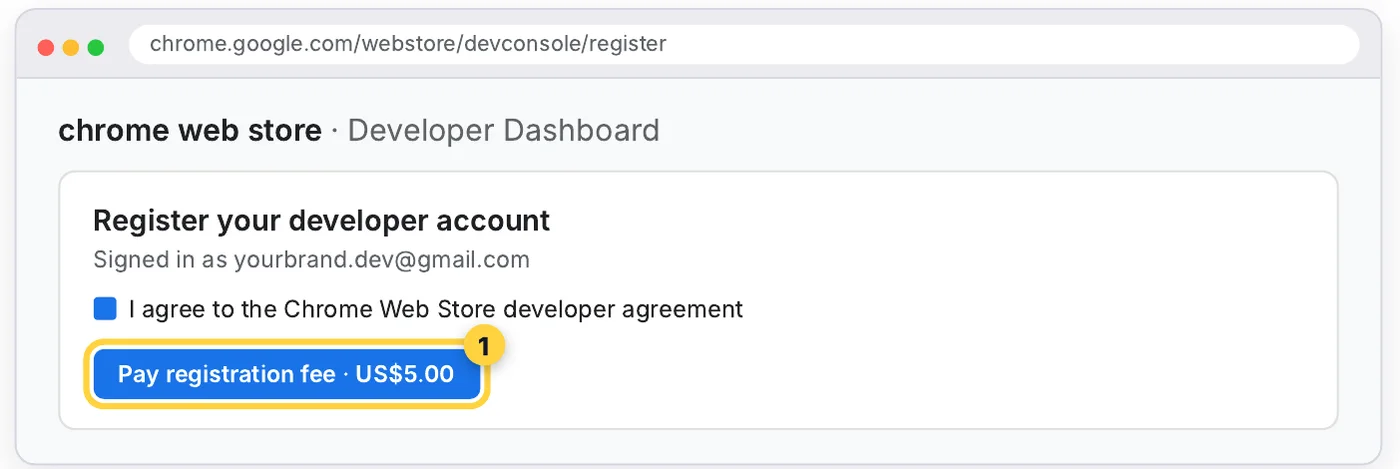
Step 4 · Upload and fill the Store listing
In the dashboard, click New item, upload your zip, then open the Store listing tab. This is where the links live:
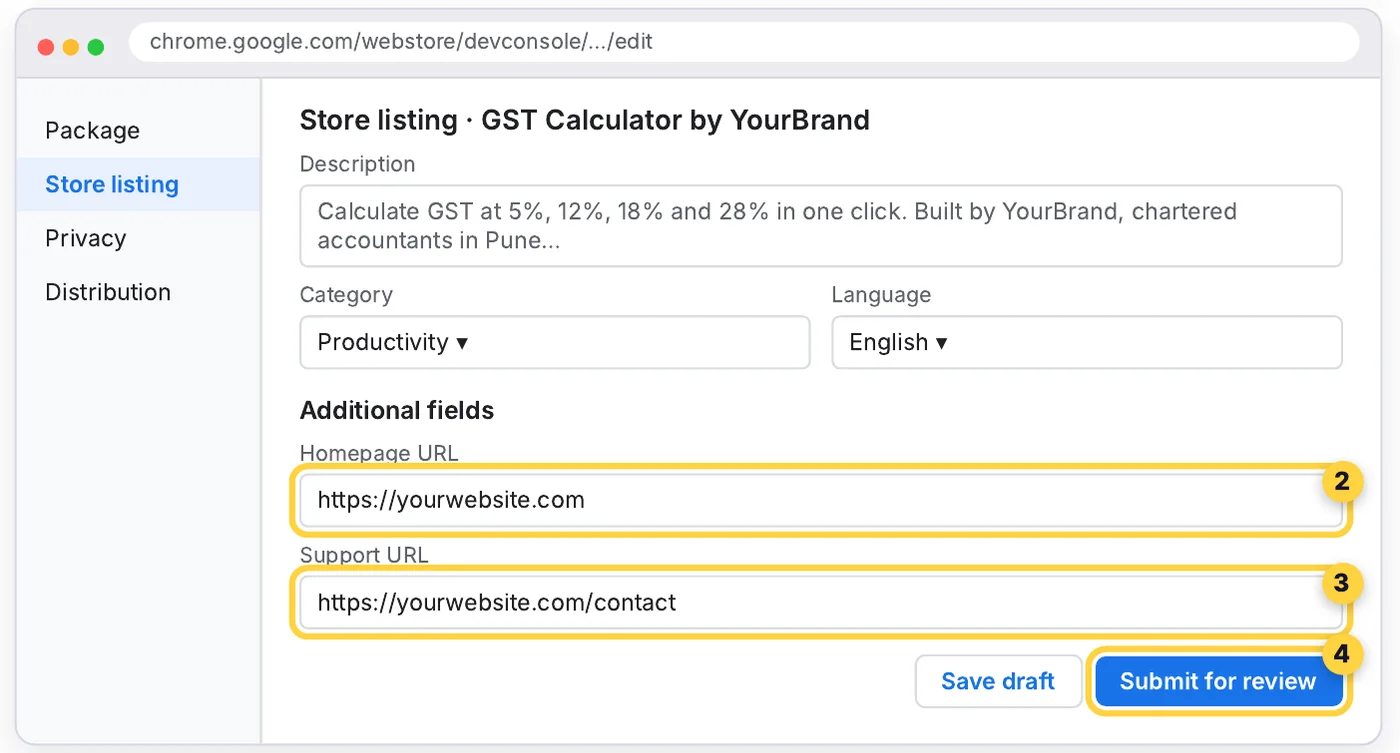
- Description: write 2–3 short paragraphs. Mention your brand and city naturally (“Built by YourBrand, chartered accountants in Pune”).
- Homepage and Support URLs: your homepage and your contact page.
- Screenshots and icon: add at least one 1280×800 screenshot and a 128×128 icon. Listings with real screenshots get more installs.
- Privacy tab: state honestly what data the extension uses. For a calculator, that's usually “none”.
- Click Submit for review. Reviews usually take a few days. After approval your listing goes live on chromewebstore.google.com.
Hack 2 — Turn a Google Doc into a public web page
Any Google Doc can be published as a read-only web page on docs.google.com. Write one useful article on a low-competition keyword, link to your site, and publish.
- Pick a keyword with low competition, such as “GST on rent for commercial property in Pune”. Use the prompt below.
- Create a Doc at docs.new. Name it exactly like the keyword. The file name becomes the page title.
- Write 600–1,000 words that actually answer the question, using headings (Format → Paragraph styles → Heading 2), short paragraphs and a simple table or checklist.
- Add 1–2 links to your website: select the text, press Ctrl + K (Cmd + K on Mac) and paste your URL. Link to the most relevant page, not just your homepage.
- Publish: go to File → Share → Publish to web and click Publish.
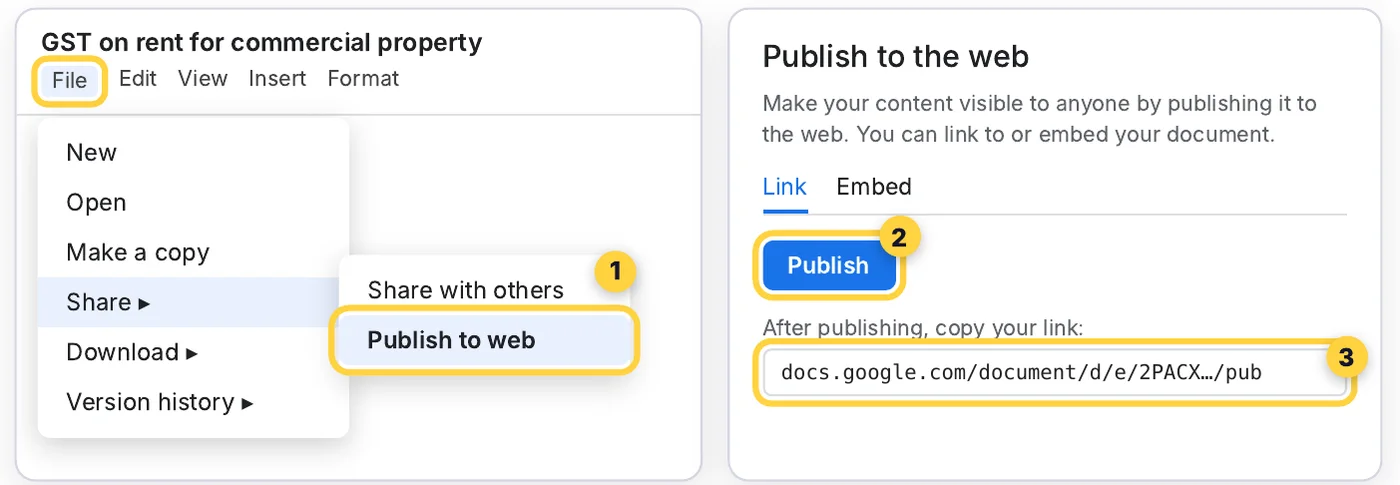
A simple outline that works
| Section | What to write |
|---|---|
| Title (H1) | The exact keyword, written as a clear title |
| Short answer | 2–3 lines that answer the question right away |
| 3–5 H2 sections | Steps, examples, rates, mistakes to avoid |
| Table or checklist | Something people will save or screenshot |
| About the author | Who you are, plus a link to your website |
Hack 3 — Build a free mini-site around one keyword
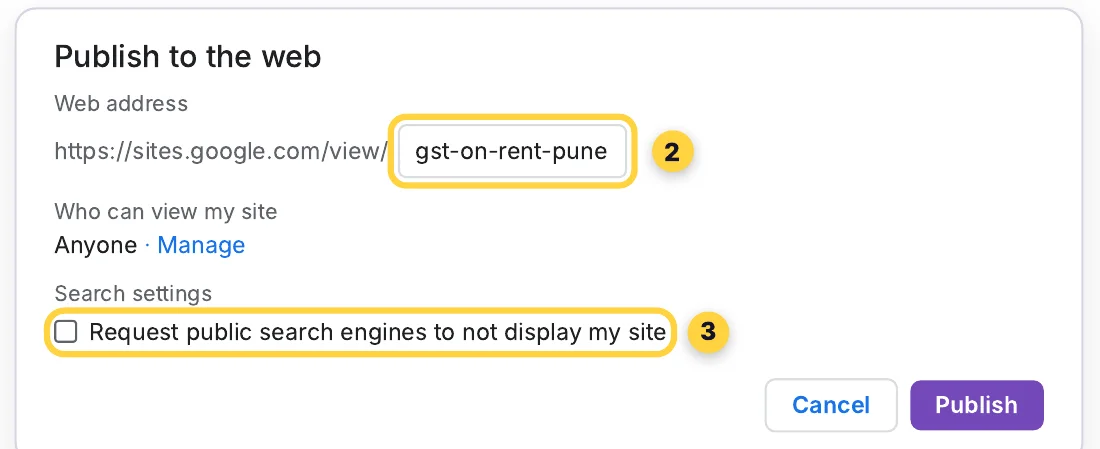
Google Sites gives you a free website at sites.google.com/view/your-name. Use it as a focused mini-site on one topic, with clear links back to your main website.
- Go to sites.google.com and click + Blank site (or pick a template).
- Target one low-competition keyword. Put it in the site name, the page title and the first heading.
- Add content: use Insert → Text box for 500–800 useful words, plus images, a FAQ section and a “Contact us” button that links to your website.
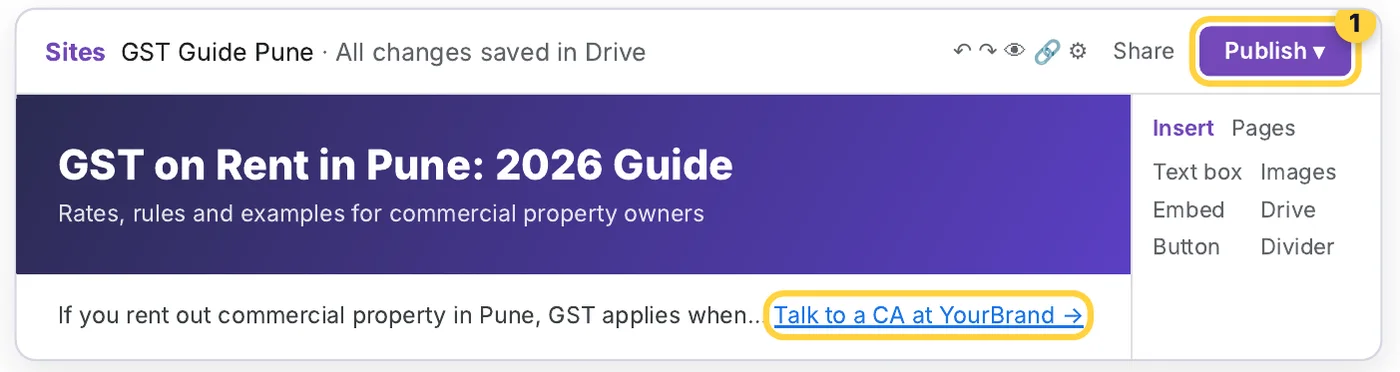
- Add your link: select text, click the link icon, paste your website URL. A big button (“Book a free consultation”) works well too.
- Click Publish, choose your web address, and make sure the site is Public.
Hack 4 — Ask a real question in the Search Console Community
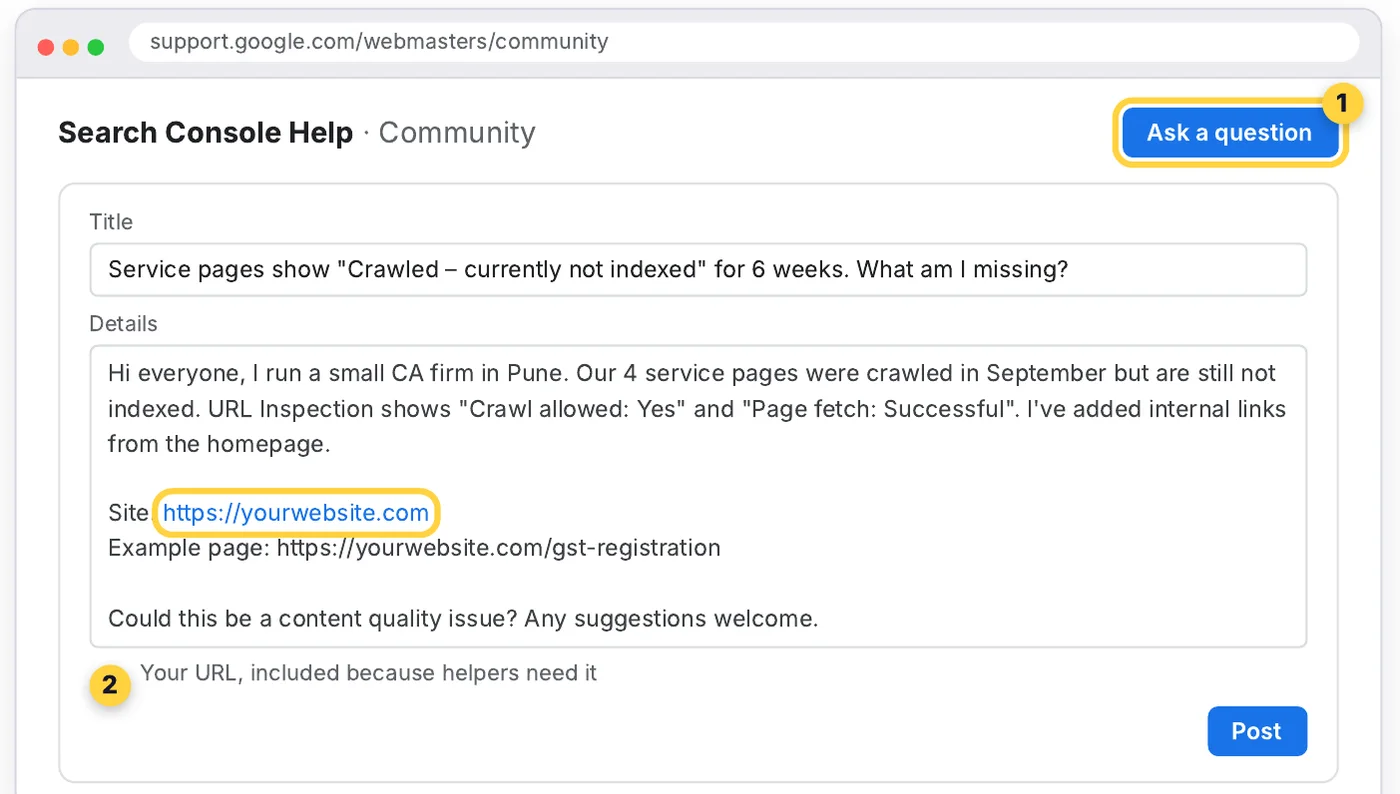
The Search Console Help Community is Google's official forum for website owners. When you ask for help, volunteers (including Google Product Experts) need your website URL to look at the problem. You get free expert advice, and your site is linked from a page on support.google.com.
- Go to support.google.com/webmasters/community and sign in.
- Search first. If your question has already been answered, read that thread instead.
- Click Ask a question. Write a clear title and describe a real problem: indexing, a Search Console error, a traffic drop.
- Add your website URL and the affected page URL. Helpers need them to answer.
- Come back, reply to the people who help, and mark the best answer.
Stuck at “Crawled – currently not indexed” yourself? First check whether you're just early: how long Google takes to notice your changes.
✓ Do
- Ask about a problem you really have
- Share your site URL once, as context
- Reply and thank helpers
- Help others once you know the answer
✕ Don't
- Fake a beginner question just to drop a link
- Post the same question repeatedly
- Add promotional links or offers
- Expect the link to pass ranking power
“Don't spam the forums or create topics or posts with spammy content… including content or URLs that are promotional or commercial in nature.”
Spam posts get removed, and your name is on the post.
Check, track and repeat
Find low-competition keywords first
Paste this into ChatGPT or Claude before you start Hacks 2 and 3:
I run [business type] in [city / country]. My website: [URL]. Suggest 15 long-tail search queries my customers type into Google that big websites don't answer well. Prefer specific questions (location, price, "how to", comparisons). For each, give: the query, the searcher's intent, and a 5-point outline for a page that fully answers it. Mark the 3 easiest to rank for and explain why.Then check each query on Google. If the top results are forums, thin pages or off-topic, it's a good target.
Check every link in 30 seconds
- Open your published page in an Incognito window. If you can see it without logging in, it's public.
- Click your link and confirm it opens your website.
- Right-click the link → Inspect. Check the
hrefshows your exact URL. - Over the next few weeks, watch Search Console → Links and Google Analytics → Referrals for visits from these platforms.
Your tracking sheet
| Platform | Published URL | Date | Link live? | Visits (30 days) |
|---|---|---|---|---|
| Chrome Web Store | ☐ | |||
| Google Doc #1 | ☐ | |||
| Google Doc #2 | ☐ | |||
| Google Site | ☐ | |||
| Search Console Community | ☐ |
Final checklist
- Every page has genuinely useful content
- Links point to relevant pages, not just the homepage
- Brand name is the same everywhere
- Google Site is Public and the search box is unticked
- Doc is published to the web, not just shared
- All URLs added to the tracking sheet
Questions
Can I get a free backlink from Google?
Yes, from four Google platforms: a Chrome Web Store listing (Homepage and Support URL fields), a Google Doc published to the web, a Google Sites page, and a question in the Search Console Help Community. Most of these links are nofollow, so treat them as a source of traffic, discovery and brand visibility rather than ranking power.
Do links from Google Docs and Google Sites help SEO?
They help Google discover your pages sooner and can send real visitors, and a published Doc or Site can itself rank for low-competition searches. Most such links are nofollow, so they don't pass much ranking power. Real ranking power still comes from useful content and links from relevant websites.
How much does it cost to publish a Chrome extension?
A one-time US$5 developer registration fee in the Chrome Web Store Developer Dashboard. The other three methods — Google Docs, Google Sites and the Search Console Community — are free.
How do I publish a Google Doc as a web page?
Open the Doc, go to File → Share → Publish to web, and click Publish. Copy the public link (docs.google.com/document/d/e/…/pub). Edits to the Doc update the published page automatically.
Why isn't my Google Site showing in search?
Check the Publish settings: if “Request public search engines to not display my site” is ticked, Google is asked to keep it out of search. Untick it, and make sure the published site is set to Public under Share.
Is it spam to post my website in the Search Console Community?
Not when you ask a real question about your site — helpers need the URL to answer. Google's Help Communities content policy forbids promotional or commercial posts, so share the URL once as context, never as an ad.
Know a business owner who needs more visitors? Forward this on WhatsApp — or keep the PDF with all four hacks, the prompts and the tracking sheet.