Google reads your Instagram too
How to make your Instagram, Facebook and LinkedIn work for your Google ranking and visibility. Three steps, with screens, caption formulas and a 30-day checklist for local businesses.
Enter your email to read the full guide
You'll get a 6-digit code to confirm it. After that the whole guide, the PDF and the WhatsApp forward are open — on every guide on this site.
Your email goes only to CC (growth_by_cc), who may write to you about guides like this. No spam, never sold. Want it deleted? Write to cc@marketingstrategy.today.
ContentsWhy socials matter to Google
- 3steps, about an hour in total
- 7social platforms you can link to your Google profile
- ₹0cost. Just settings and better captions
Google looks at what the whole internet says about you
Google ranks local businesses on three things: relevance, distance and prominence. Prominence is how well-known your business is, and Google says it uses information from across the web, such as how many websites link to you and how many reviews you have.
Your Instagram, Facebook and LinkedIn pages are part of that picture. When they clearly belong to the same business, with the same name, address and phone, they add to how real and well-known you look.
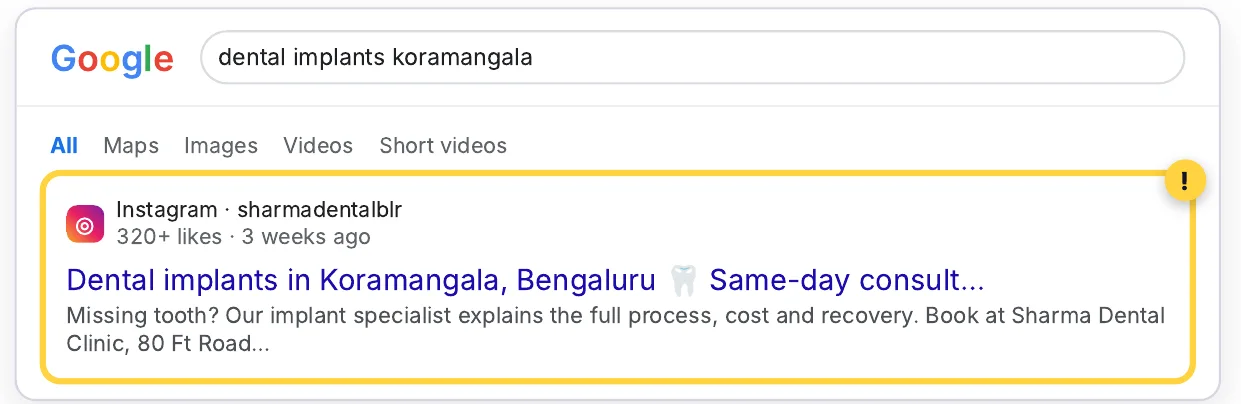
And since July 2025, Instagram posts can appear in Google
Public posts and Reels from professional accounts (Business or Creator, run by adults) can now show up in Google search results. A good post can bring customers to you straight from a Google search.
Step 1 — Make your business details match, word for word
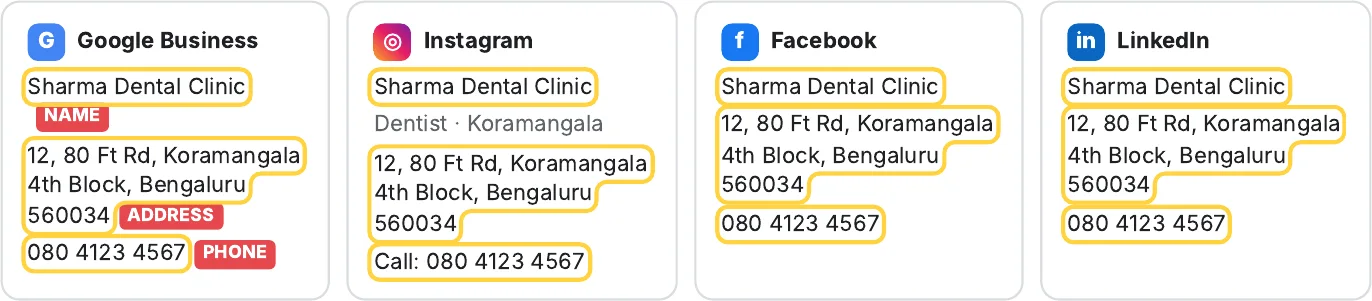
Your Google Business Profile is the master copy. Every social profile should show the same business name, address and phone number (called NAP in SEO), in the same format.
Rules that trip people up
| Detail | ✕ Inconsistent | ✓ Consistent |
|---|---|---|
| Business name | “Dr Sharma’s Dental” on Instagram, “Sharma Dental Clinic” on Google | Exactly “Sharma Dental Clinic” everywhere |
| Address | “Kormangala, Blr” vs “Koramangala 4th Block, Bengaluru” | The full Google address, including pin code |
| Phone | A personal mobile on Facebook, the clinic landline on Google | The same primary number everywhere |
| Website | Old domain or a Linktree on some profiles | Your main website on all profiles |
Where to update
- Instagram: Edit profile → Name, Bio, Contact options / Address
- Facebook Page: About → Contact and basic info
- LinkedIn Page: Edit page → Details and Locations
- Also check JustDial, IndiaMART, Practo, Zomato and similar directories
Step 2 — Add your social links to Google Business Profile
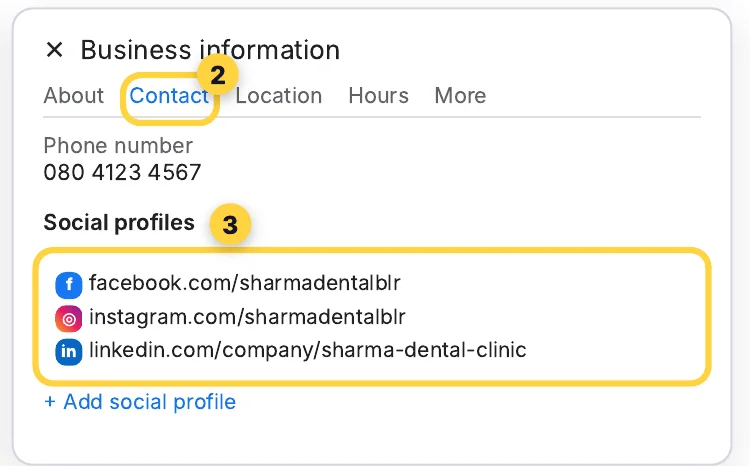
This tells Google directly: “these pages belong to my business.” Google lets you add one link each for Facebook, Instagram, LinkedIn, Pinterest, TikTok, X and YouTube.
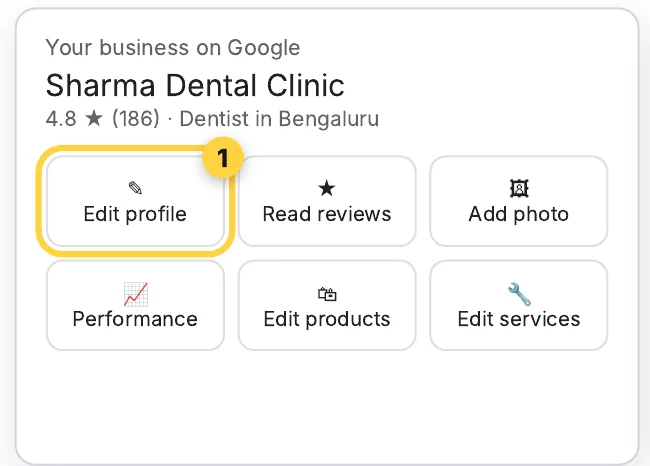
- Go to business.google.com, or search your business name on Google while signed in.
- Click Edit profile, then open the Contact tab.
- Next to Social profiles, click the ✎ edit icon.
- Choose the platform from the dropdown and paste the full link to your profile.
- Click + Add social profile for each platform, then Save.
Step 3 — Write every post so Google (and customers) can find it
First, check two settings
- Your Instagram must be a professional account (Business or Creator) and public. Settings → Account type and tools.
- Make sure “Allow public photos and videos to appear in search engine results” is ON. It's under Settings → Account privacy, and is usually on by default.
Then use this caption formula
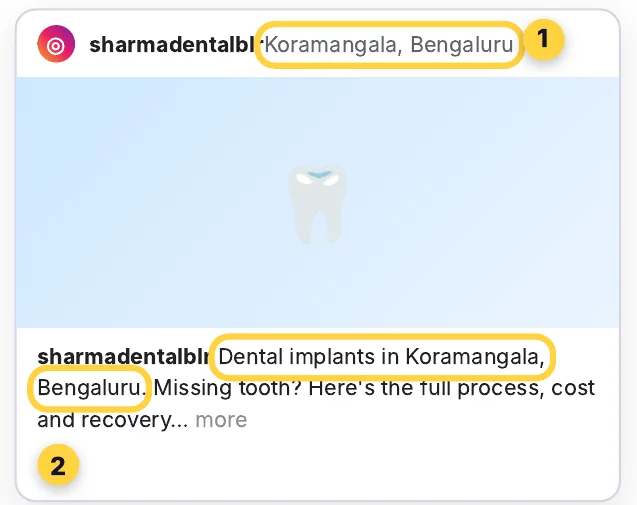
[Service] in [Area], [City] + one useful line
Put it in the first line, because that's what search engines and people see first. Then tag your location.
| Business | First line of caption |
|---|---|
| Dentist | Dental implants in Koramangala, Bengaluru |
| CA firm | GST registration in Baner, Pune |
| Café | Best filter coffee in Mylapore, Chennai |
| Salon | Bridal makeup in Rajouri Garden, Delhi |
| Plumber | Geyser repair in Andheri West, Mumbai |
| Gym | Personal training in Sector 62, Noida |
Extra boosts
- 📍 Location tag every postUse your exact business location, not just the city.
- 🔤 Add alt textAdvanced settings → Write alt text: “Dentist explaining dental implant at Sharma Dental Clinic, Koramangala”.
- 🗣️ Say it in the ReelSay your service and area out loud, and put them in the on-screen text too.
- 🏷️ 3–5 specific hashtags#KoramangalaDentist beats #dentist. Mix area, city and service.
Do it this week: caption prompt + 30-day checklist
Get a month of local captions in one go
Paste this into ChatGPT or Claude:
I run [business type] called [business name] in [area, city]. My main services: [list 3–5]. Write 12 Instagram captions for the next month. Rules: the first line must be "[service] in [area], [city]" (rotate services and nearby areas); then 2–3 short, useful lines a customer would care about (price range, process, timing, FAQs); end with one clear call to action (call, DM or visit) and 4 local hashtags. Also give one alt-text line for each post. Keep it simple and natural, not keyword-stuffed.30-day checklist
| When | Task | Done |
|---|---|---|
| Day 1 | Copy the name, address and phone exactly from your Google Business Profile | ☐ |
| Day 1 | Update Instagram, Facebook and LinkedIn to match it word for word | ☐ |
| Day 2 | Add all social links in Google Business Profile → Edit profile → Contact | ☐ |
| Day 2 | Switch Instagram to a professional, public account; check the search-engine setting is ON | ☐ |
| Day 3 | Generate 12 captions with the prompt above | ☐ |
| Weeks 1–4 | Post 3× a week: service + area first, location tag, alt text | ☐ |
| Day 30 | Google your main service + area. Note which posts or profiles appear | ☐ |
| Day 30 | Check Google Business Profile → Performance for calls, direction requests and website clicks | ☐ |
Questions
Does Instagram help local SEO?
Indirectly, yes. Google ranks local businesses on relevance, distance and prominence, and prominence draws on information from across the web. Social profiles that clearly belong to the same business, with the same name, address and phone, help Google connect and trust your details, and since July 2025 your public posts can appear in Google search themselves. Your Google Business Profile, reviews and website still do the heavy lifting.
Can Instagram posts show up in Google search?
Yes. Since July 2025, public posts and Reels from professional accounts (Business or Creator) run by adults can appear in Google search results. Check that “Allow public photos and videos to appear in search engine results” is on, under Settings → Account privacy.
How do I add my Instagram to my Google Business Profile?
Open business.google.com (or search your business name on Google while signed in), click Edit profile, open the Contact tab, click the edit icon next to Social profiles, choose Instagram from the dropdown and paste the full link to your profile, then Save. You can add one link each for Facebook, Instagram, LinkedIn, Pinterest, TikTok, X and YouTube.
Why don't my social links show on my Google profile?
Google says the feature is available only in some regions, and added links may not always show on your public profile. Add them anyway. If Google has auto-added an old or wrong link, you can replace it in the same place.
What is NAP consistency?
NAP is your business name, address and phone number. Consistency means showing them word for word the same on your Google Business Profile, your social profiles and directories like JustDial and IndiaMART, using the Google profile as the master copy.
What should the first line of an Instagram caption be for local SEO?
Your service, your area and your city, then one useful line: for example “Dental implants in Koramangala, Bengaluru”. The first line is what search engines and people see first. Then tag your exact business location.
Know a local business owner who posts on Instagram every day? Forward this on WhatsApp — or keep the PDF with all three steps, the prompt and the 30-day checklist.